Cross Stitch Photoshop Action: A Designer's Holiday Season Toolkit
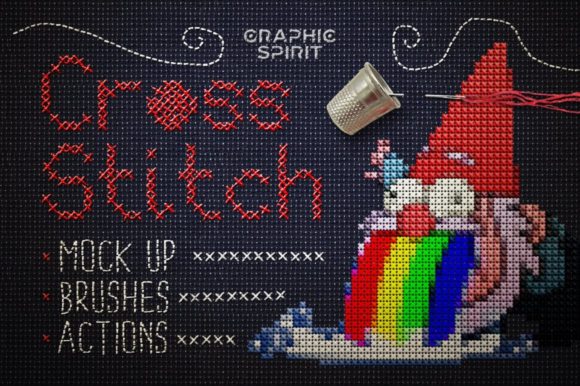
Every year, as the holidays approach, my design schedule fills with requests for cozy, nostalgic, and handmade-looking items. When I first saw the Cross Stitch Photoshop Action on Creative Fabrica, my immediate impression was of a tool that could capture that precise seasonal mood. It isn't a single embroidery file, but an Add-On that transforms any graphic into a cross-stitch style. For a designer planning a holiday collection, this opens a world of possibility.
Crafting the Holiday Atmosphere with Digital Tools
The emotional tone this action creates is inherently cozy, nostalgic, and festive. The simulated cross-stitch texture evokes handmade traditions, family heirlooms, and warm, rustic charm. Whether I’m aiming for playful Christmas motifs, elegant winter scenes, or spiritual sentiments, this action provides a consistent decorative style that feels personal and gift-ready. The detail level from the canvas styles and brushes is impressive, giving graphics a textured, stitched appearance that buyers instantly recognize as premium and craft-centric.
Building a Seasonal Product Line from One Action
For my holiday shop collection, I envision using Cross Stitch Photoshop Action across multiple products. The key is starting with a strong graphic—a holiday phrase, a festive illustration, a family name—and then applying the action to create a unified look across different items. This is invaluable for brand consistency during the busy shopping season.
Imagine a single “Merry & Bright” graphic, transformed into cross-stitch style, then applied to a range of seasonal embroidery products:
- Sweatshirt embroidery for family matching holiday apparel.
- Tote bag designs for craft fair displays and gift shopping.
- Kitchen towel embroidery as quick, popular handmade gifts.
- Embroidered pillow covers for home decor that feels special and limited-edition.
- Embroidered patches for customizable stockings or ornaments.
- Baby items and aprons with playful, cute holiday themes.
The ability to “make your own design” means I can tailor messages for personalized gifts—last-minute orders for grandparents or custom family quotes—which are huge during holidays. The generated artwork also becomes perfect for social media previews, product mockups, and printable promotional graphics to build engagement before craft fairs or Etsy listing launches.
Performance in Real Holiday Selling Situations
In practical terms, this Graphics add-on streamlines production. For gift bundles, I can create a coordinated look across a towel, patch, and sweatshirt without manually stitching each design element. For Etsy listings, the consistent aesthetic builds customer trust and visual recognition; shoppers know my shop delivers that handmade charm. When planning limited edition apparel or family matching items, I can quickly adapt the same core graphic for different products, saving crucial time during the peak season.
The Cross Stitch Photoshop Action directly enhances product value and giftability. A tote bag with a standard print might be nice, but a tote with a design that looks lovingly cross-stitched feels thoughtful, premium, and emotionally resonant. This perceived value is key for holiday shoppers looking for meaningful presents.
Practical Considerations for Embroidery Application
Once the graphic is transformed using the provided .psd and .asl files, it becomes a digital embroidery file for machine use. However, as an experienced designer, I must note where this style should be applied carefully. The cross-stitch simulation can create areas of high stitch density.
Here are my practical notes for successful holiday embroidery projects:
- Always check hoop size compatibility. Designs with large, filled areas may require larger hoops.
- Review small details after stitching. Tiny lettering or intricate layered details simulated by the action might need simplification for clean stitching on items like dark fabric or thick towels.
- Use proper stabilizer for challenging substrates like stretchy garments or curved caps to maintain the graphic’s integrity.
- Plan matching color palettes and test thread colors on both light and dark fabric. The action creates a visual style, but thread choice brings it to life.
- Consider fabric texture. The cross-stitch look works beautifully on canvas totes and pillow covers but may need adjustment for very dense or delicate materials.
- For items needing repeated washing, like kitchen towels, ensure the final stitch file is robust and not overly delicate.
Crucially, I advise all Etsy sellers and small shop product creators to check Creative Fabrica product details and licensing before selling finished seasonal products. The action helps create the design, but the final machine embroidery design file parameters and commercial use terms must be verified.
Elevating Seasonal Appeal and Buyer Engagement
Ultimately, the Cross Stitch Photoshop Action is a powerful tool for enhancing seasonal appeal. During holidays, buyers are drawn to products that feel authentic, heartfelt, and crafted. This action helps digital designs embody those qualities. It allows handmade gift makers and apparel decorators to scale their vision without losing the handmade essence.
For my own business, integrating this tool means I can respond faster to holiday trends, create cohesive collections that stand out at craft fairs, and produce gift-ready products that convey a story. The nostalgic, rustic style taps directly into holiday emotions, making items more likely to be purchased as gifts and cherished. It’s not just an add-on; for the holiday rush, it’s a strategic asset for any designer building a collection meant to warm hearts and homes.